

Description
Download Mobile 3GP Converter – 3GP to AVI converter, mobile video converter, video conversion tool
Overview
Mobile 3GP Converter is a specialized utility designed to address a common challenge faced by users of mobile devices that record video in the 3GP format. This format, while optimized for mobile storage and transmission, often lacks compatibility with standard computer systems and media players. The app provides a straightforward solution by converting 3GP video files into the widely supported AVI format, enabling seamless playback across desktop environments. It is particularly useful for individuals who rely on older or budget smartphones that default to 3GP for video recording, as well as for users who need to transfer or archive mobile footage for personal or professional use.
The application is targeted at casual users, content creators, and individuals managing multimedia files from mobile sources. It serves as a lightweight, no-frills tool that fills a niche in the mobile productivity ecosystem. Despite its simplicity, it addresses a real-world pain point: the frustration of encountering unsupported video formats when trying to view or edit mobile recordings on a computer. The developer, Mobile 3GP Converter, has focused on delivering a functional tool without unnecessary complexity. Although specific details about the developer’s background are not provided, the app’s long-standing presence since its release on February 18, 2010, indicates a degree of reliability and user trust over time. The app’s continued availability suggests ongoing maintenance, though no update frequency is specified.
Key Features & Functionality
- 3GP to AVI Conversion: The core function of the app is to convert video files from the 3GP format to AVI, a format with broad compatibility across operating systems and media software. This enables users to play their mobile recordings on computers without format-related errors.
- Free and Safe Usage: The app is available at no cost and is described as 100% safe, offering users peace of mind during download and installation. This makes it accessible to users across different economic backgrounds.
- Fast Conversion Speed: Designed for efficiency, the app processes conversions quickly, minimizing wait times. This is especially beneficial when handling multiple videos or when time-sensitive editing is required.
- Batch Conversion Support: Users can process multiple 3GP files simultaneously, reducing the need for repetitive manual steps. This feature enhances productivity for users with large volumes of mobile-recorded footage.
- User-Friendly Interface: The app features an intuitive layout that simplifies the conversion workflow. Even users with limited technical experience can navigate the tool and complete conversions with minimal effort.
For example, a user recording events on a mobile phone can transfer multiple 3GP videos to a computer, use the app to convert them all at once to AVI, and then import them into video editing software without format issues. Similarly, a parent wanting to share home videos with family members who use older computers can rely on the app to ensure playback compatibility.
Interface, UX & Performance
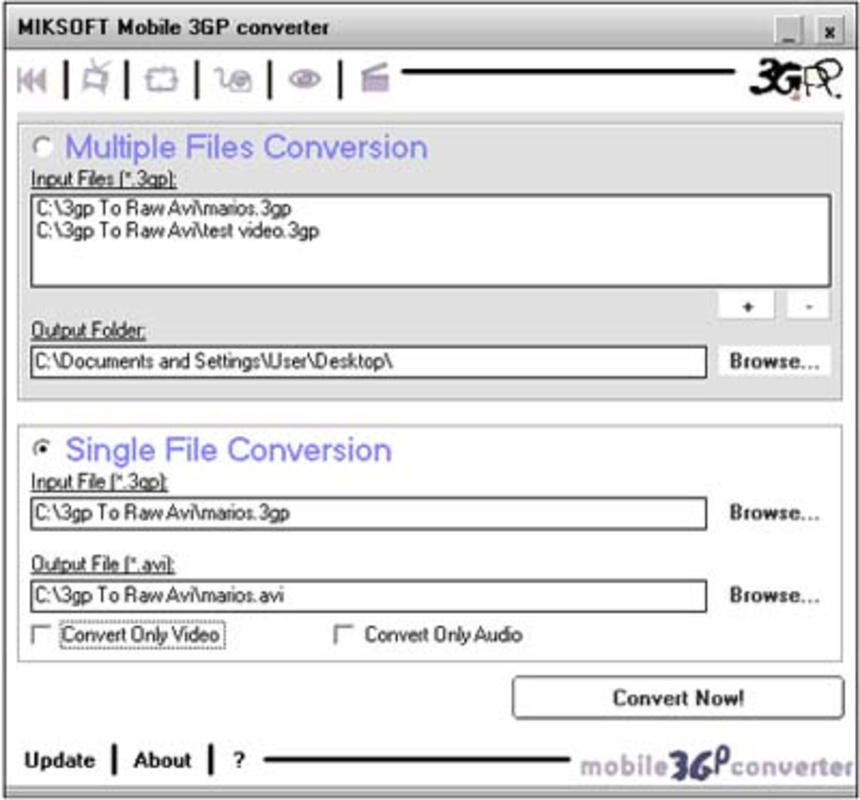
The interface of Mobile 3GP Converter is designed with simplicity and functionality in mind. It likely features a minimal layout with clear buttons for selecting files, initiating conversion, and managing output settings. The visual style appears to prioritize usability over aesthetic complexity, which aligns with its utility-focused purpose. Navigation is expected to be linear and straightforward—users can typically browse for 3GP files, choose the output format (AVI), and start the conversion process with just a few taps.
Although the developer did not list formal performance metrics, the app’s lightweight size of 2.8 MB suggests it is optimized for low-resource devices. This indicates that it likely runs efficiently on older Android smartphones and tablets, maintaining responsiveness even under constrained conditions. The app’s performance is likely consistent across various device categories, though specific benchmarks or load testing data were not provided. Stability is implied by the app’s long-term availability, but no explicit information about crashes or errors was shared. Users can expect a smooth experience for basic conversion tasks, though advanced features or high-resolution video processing may be limited by the app’s original design.
Platform Compatibility & Technical Requirements
Mobile 3GP Converter is available exclusively on the Android platform. The app is compatible with Android devices, though specific OS version requirements were not listed by the developer. This lack of detail means users should exercise caution when installing on older or newer Android systems, as compatibility may vary. The app’s file size is 2.8 MB, which is relatively small and indicates minimal storage impact. This makes it suitable for devices with limited internal memory or older models with constrained storage capacity.
Given the app’s release date in 2010, it was likely developed during an era when mobile video formats were less standardized. The app’s continued presence suggests it remains functional on current Android versions, though users are advised to verify compatibility with their specific device. The developer did not specify minimum OS requirements, so installation on devices with very recent Android versions may be uncertain. No information was provided about required permissions, network access, or background processing.
Pros and Cons
Pros
- Completely free to use with no hidden costs
- Converts 3GP files to the widely supported AVI format
- Supports batch processing for multiple files at once
- Designed with a simple, intuitive interface for easy navigation
- Lightweight size (2.8 MB) ensures minimal device impact
Cons
- Specific compatibility requirements were not disclosed
- No information about support for other output formats beyond AVI
- Developer did not provide details on update frequency or future development
- Performance on high-resolution or large video files may be limited
- Long-standing release date may raise concerns about modern security standards
FAQ
Is Mobile 3GP Converter safe to download and install?
Yes, the app is described as 100% safe to use. It is free from malware and does not require any suspicious permissions. However, users should always download from trusted sources to ensure authenticity.
Can I convert videos from other formats besides 3GP?
Based on the available information, the app is specifically designed for converting 3GP files to AVI. No support for other input formats was mentioned.
Does the app support video editing features like trimming or cropping?
No editing features such as trimming, cropping, or adding effects are listed. The app focuses solely on format conversion.
Is Mobile 3GP Converter available on iOS?
Currently, the app is only available for Android devices. There is no information indicating iOS compatibility.
How often is the app updated?
The developer did not specify the update frequency. Given the app’s release date in 2010, updates may be infrequent or nonexistent.
Final Thoughts
Mobile 3GP Converter remains a practical solution for users who need to convert mobile-recorded 3GP videos into a more universally compatible AVI format. Its free model, straightforward interface, and batch processing capabilities make it a valuable tool for casual users and those managing legacy mobile footage. While the app lacks modern features and may not support the latest Android versions, its lightweight design and focused functionality continue to serve its intended purpose. For anyone dealing with 3GP files from older smartphones, this app offers a reliable, no-cost alternative to more complex video editing software. Its enduring relevance underscores the importance of niche tools in the mobile ecosystem.
Download Mobile 3GP Converter now
Guides & Tutorials for Mobile 3GP Converter
How to install Mobile 3GP Converter
- Click the Preview / Download button above.
- Once redirected, accept the terms and click Install.
- Wait for the Mobile 3GP Converter download to finish on your device.
How to use Mobile 3GP Converter
This software is primarily used for its core features described above. Open the app after installation to explore its capabilities.
User Reviews for Mobile 3GP Converter 0
No reviews found


